If you want to rank a new website, there are two things you need:
Great content.
And authority.
But here’s the problem.
Most people try to build authority by publishing random articles and then immediately chasing backlinks.
We approach it differently for our client.
Firstly, we build topical authority.
Then, we use backlinks to strengthen the pages that are already showing signs of ranking.
In this guide, I’ll walk you through the exact process.
We’ll use a roofing website as an example.
Table of Contents
What Is Topical Authority?
Topical authority means your website covers a specific subject deeply enough that search engines can understand what your site is about and users can find answers to many related questions in one place.
For example, imagine you create a website about roofing in Texas.
You could publish one article about “roofing companies in Texas.”
Or you could build an entire content ecosystem around roofing.
You could cover:
- Roof repair
- Roof replacement
- Roof inspections
- Roof leaks
- Roofing materials
- Roofing costs
- Roof maintenance
- Storm damage
- Shingles
- Metal roofing
- Commercial roofing
- Residential roofing
- Local roofing questions
Now you’re not just targeting one keyword.
You’re building a resource around the entire topic.
That’s the basic idea behind topical authority.
Step 1: Pick a Niche

Before you write a single article, choose your niche.
For this example, let’s say we’e going after:
Roofing companies in Texas.
This is much more focused than creating a general home improvement website.
You can go even narrower if the market allows it.
For example:
- Roofing in Austin
- Roofing in Houston
- Commercial roofing in Texas
- Roof repair in Dallas
The more focused your niche, the easier it becomes to understand what content belongs on your website.
But don’t go so narrow that you run out of useful topics.
Step 2: Get a Relevant Domain
If you’re starting from scratch, you can consider using a domain related to your niche.
For example:
RoofingForTexas.com
Now, let’s clear something up.
Exact-match domains don’t work like they did years ago.
Putting a keyword in your domain won’t suddenly make Google rank you.
Your domain is not a replacement for good SEO.
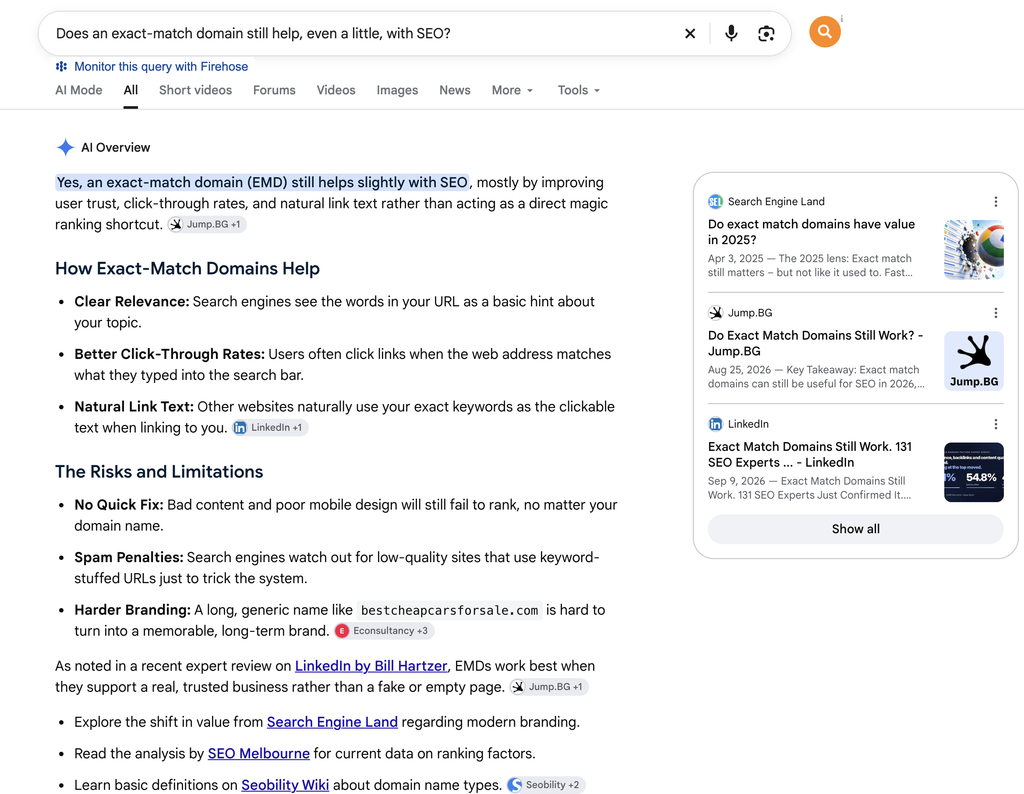
But google and LLM’s still like relevant domains for niche websites because they immediately communicate what the website is about.
Step 3: Build a Huge Keyword List
Here’s where things get interesting.
Don’t start writing after finding 10 keywords.
Build a database.
We generally start with at least 100 relevant keywords.
Depending on the size of your niche, you may eventually have hundreds or even thousands.
And here’s something many SEOs get wrong:
You don’t need every keyword to have 1,000+ monthly searches.
In fact, I actively look for low-volume keywords.
Some of them might show:
0 searches
or
0-10 searches per month.
That’s okay.
Keyword tools don’t have perfect data.
A keyword showing zero volume doesn’t necessarily mean zero people search for it.
A highly specific question can still bring relevant visitors.
And more importantly, these small topics can help you cover the niche more completely.
Step 4: Use Multiple Keyword Research Tools
Don’t rely on one keyword tool.
Combine different sources because each one can uncover different ideas.
Here are some places you can look:
- Ahrefs
- AlsoAsked
- AnswerThePublic
- Google Trends
- Google autocomplete
- Google People Also Ask
Let’s take AlsoAsked as an example.
Imagine you search for:
“roof repair”
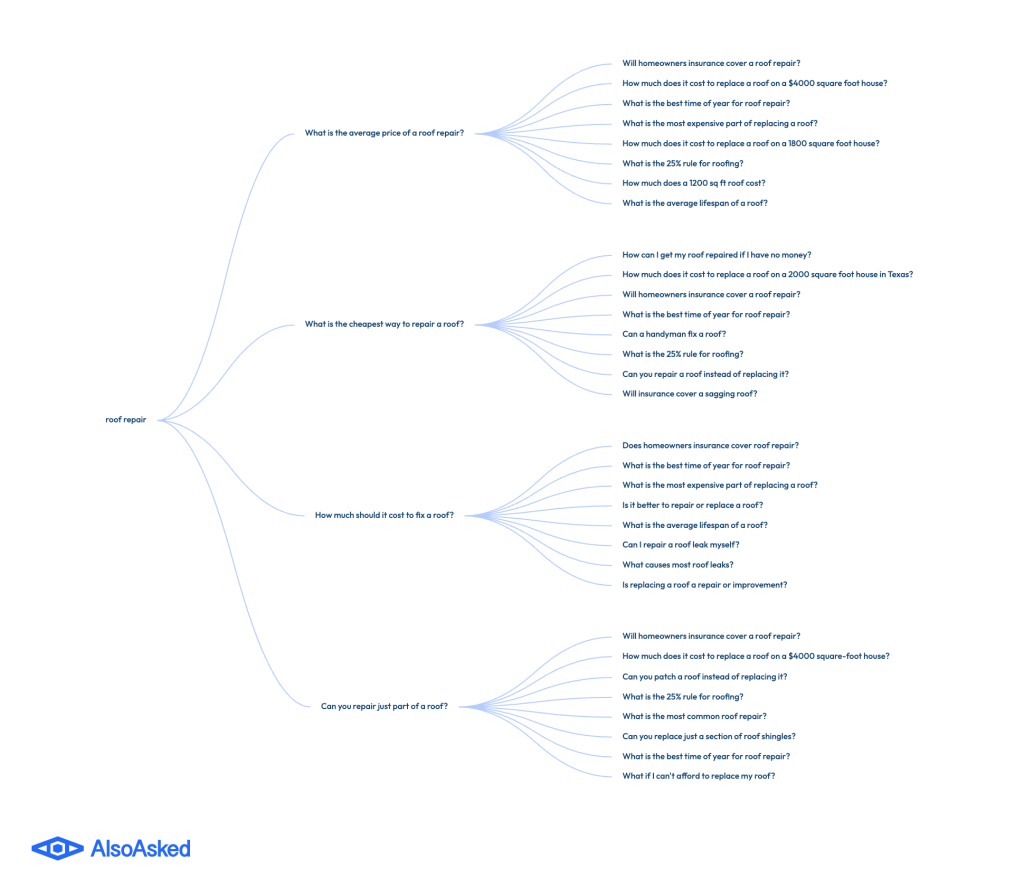
Instead of giving you one keyword, the tool can uncover questions that people ask around that topic.
You might find questions like:
- How much does roof repair cost?
- How long does roof repair take?
- How do I know if my roof needs repair?
- Can a roof leak be repaired?
- What causes roof leaks?
- How often should a roof be inspected?
Now you’ve got more topics to investigate.
Step 5: Put Everything Into a Spreadsheet

Don’t keep your keyword research scattered across different tools.
Create a Google Sheet.
You can add other columns too.
For example:
- Primary keyword
- Secondary keywords
- Search intent
- Topic cluster
- Article title
- Internal links
- Publishing date
- Update date
This spreadsheet becomes your content roadmap.
Step 6: Don’t Create 10 Articles for the Same Keyword
This is one of the biggest mistakes I see.
Let’s say you find these keywords:
- Roof repair cost
- Cost of roof repair
- Roofing repair cost
- How much does roof repair cost?
Should you create four articles?
No.
They’re basically asking the same question.
Create one really good article that covers the topic.
But here’s where it gets interesting.
Suppose you find:
How much does a roof inspection cost?
That’s a different question.
It could deserve its own page.
The goal is to create a page when the search intent is meaningfully different.
Step 7: Group Your Keywords Into Topic Clusters
Now take your giant keyword list and organize it.
For example:
Roof Repair
- Roof repair cost
- Roof leak repair
- Emergency roof repair
- Roof repair timeline
- Signs of roof damage
- Roof flashing repair
Roof Replacement
- Roof replacement cost
- Roof replacement timeline
- When to replace a roof
- Roof replacement process
- Roof replacement materials
Roof Maintenance
- Roof inspection checklist
- Roof maintenance tips
- How often to inspect a roof
- Roof cleaning
- How to prevent roof leaks
Roofing Materials
- Asphalt shingles
- Metal roofing
- Tile roofing
- Flat roofing
- Roofing material lifespan
Now you have a topical map.
And this is much more useful than a giant spreadsheet full of random keywords.
Step 8: Start With Low-Competition Topics
Here’s another thing I like about this strategy.
You don’t need to attack the biggest keyword first.
A new website probably won’t rank immediately for something like:
roofing company
That’s extremely broad.
Instead, start by covering specific questions.
For example:
How long does a roof inspection take?
Or:
What are the signs that a roof needs replacing?
These keywords may have much less competition.
And when you consistently cover relevant topics, you start building a strong topical foundation.
Step 9: Create Something Better Than What’s Already Ranking
This is where keyword research ends.
And actual SEO begins.
Finding a keyword doesn’t mean you’ve created a good article.
Before writing, look at what already ranks.
Ask:
What is missing?
Maybe the current articles don’t explain the topic clearly.
Maybe they don’t include examples.
Maybe they’re outdated.
Maybe they don’t answer the most common follow-up questions.
Maybe they have terrible formatting.
That’s your opportunity.
Don’t just rewrite what’s already there.
Make the page more useful.
Step 10: Add Your Own Information and Experience
This is another big one.
Your content shouldn’t sound like five other websites stitched together.
Add useful information that actually helps the reader.
For example, if you’re writing about roof replacement costs, don’t just say:
“Roof replacement costs $X.”
Explain what affects that cost.
For example:
- Roof size
- Material
- Labor
- Roof design
- Location
- Existing damage
- Removal costs
Now the reader understands the subject.
That’s much more useful than copying a number from another website.
Step 11: Don’t Turn AI Into a Content Factory
AI can be extremely useful.
But here’s what I wouldn’t do:
Generate 500 articles.
Click publish 500 times.
Wait for Google traffic.
That’s not a strategy.
Use AI to help you work faster.
For example, you can use it to:
- Organize research
- Create outlines
- Find missing questions
- Identify content gaps
- Improve readability
- Suggest internal links
- Review your article structure
But you should still bring something to the article.
Your research.
Your examples.
Your analysis.
Your experience.
Your original information.
AI should help you create better content.
It shouldn’t replace the thinking behind the content.
Step 12: Answer the Question Immediately
Here’s a simple UX improvement that can make your content much easier to use.
If someone searches for:
How long does a roof inspection take?
Answer it near the top.
Don’t make them read 1,500 words first.
Give them the short answer.
Then explain everything else.
For example:
A typical roof inspection can take anywhere from around 30 minutes to several hours, depending on the property and inspection requirements.
Then go deeper.
Explain:
- What the inspector checks
- Why inspections take different amounts of time
- What happens during the inspection
- What happens afterward
This works especially well for long-tail queries.
Step 13: Connect Your Articles With Internal Links
Now you’ve published 50, 100, or even 200 articles.
Don’t leave them sitting there independently.
Connect them.
For example, your article about:
Roof Repair Cost
could link to:
- Signs of Roof Damage
- Emergency Roof Repair
- Roof Inspection Checklist
- Roof Replacement Cost
- How Long Roof Repairs Take
And those pages can link back to relevant articles.
This creates a connected content network.
It also makes it easier for users and search engines to discover related pages.
Step 14: Build Topic Hubs
You can take internal linking one step further.
Create major topic hubs.
For example:
Roofing
→ Roof Repair
→ Roof Replacement
→ Roof Maintenance
→ Roofing Materials
→ Roof Inspection
Each major topic can have several supporting articles.
This gives your website a logical structure.
Instead of having 200 random blog posts, you have an organized resource.
Step 15: Don’t Ignore Basic On-Page SEO
Once the content is good, optimize the page.
Use:
- A clear title tag
- A useful meta description
- One clear H1
- Logical H2 and H3 headings
- Clean URLs
- Internal links
- Descriptive image filenames
- Useful alt text
- Table of contents when appropriate
- Structured data where relevant
- Mobile-friendly design
- Fast-loading pages
Now, don’t obsess over these things.
Changing your meta description isn’t going to turn a terrible article into a ranking page.
These are the fundamentals.
Do them properly and move on.
Step 16: Optimize Your Images
Image SEO is another small piece of the puzzle.
Don’t upload:
IMG-92837.jpg
Use a descriptive filename when appropriate:
asphalt-shingle-roof-repair.jpg
And write useful alt text.
For example:
Asphalt shingles damaged around a roof vent
Don’t stuff keywords into alt text.
Describe the actual image.
Also compress your images.
A beautiful 5 MB image isn’t very useful if it slows your page down.
Step 17: Keep Publishing
Topical authority doesn’t happen after publishing 10 articles.
Keep expanding your coverage.
If you’ve published 100 roofing articles, there are probably still questions you haven’t answered.
Keep researching.
Keep finding gaps.
Keep improving.
But don’t confuse consistency with publishing garbage every day.
I’d rather publish 20 genuinely useful articles than 200 pages that nobody needs.
Step 18: Watch Google Search Console
Once your website starts getting impressions, Google Search Console becomes extremely useful.
Look at:
- Impressions
- Clicks
- Average position
- Queries
- Pages
- CTR
But pay special attention to something else.
Queries you didn’t intentionally target.
You may publish an article targeting:
roof repair cost
and discover that Google is showing the page for:
average cost to repair roof leak
That’s useful information.
It can tell you what Google thinks your page is relevant for.
And it can reveal your next content opportunities.
Step 19: Update Your Existing Content
Topical authority isn’t a “publish once and forget” strategy.
Your content needs maintenance.
When something changes, update it.
When you find a missing section, add it.
When you discover a useful related article, add an internal link.
When an old statistic becomes outdated, replace it.
You don’t need to update every page every three months just because a calendar says so.
Update pages when you have something meaningful to improve.
Step 20: Now Start Building Backlinks
This is where I would start putting more effort into backlinks.
Notice what happened first.
We:
Picked a niche → researched hundreds of topics → grouped them → created useful content → internally linked everything → built topical coverage.
Now we have something worth promoting.
And if you’ve done this correctly, some pages may already be ranking.
Maybe you’re ranking on page one for some long-tail keywords.
Maybe you’re sitting around positions 5-20 for other keywords.
That’s a great time to start building relevant backlinks.
You can pursue:
- Industry publications
- Relevant websites
- Digital PR
- Resource pages
- Partnerships
- Expert contributions
- Original research
- Useful statistics
- Linkable assets
Don’t build links just because a website has a high authority metric.
A relevant link from a website in your industry can make much more sense than a random link from an unrelated site.
Final Takeaway
Building topical authority isn’t about publishing 1,000 AI-generated articles.
It’s about becoming genuinely useful around one subject.
Start with a niche.
Build a large keyword database.
Look for low-competition and long-tail topics.
Use tools like Ahrefs, AlsoAsked, AnswerThePublic, and Google Trends to uncover questions.
Remove duplicate search intent.
Group your keywords into topic clusters.
Then create content that actually solves problems.
Add your own research, examples, and perspective.
Use AI to make your workflow faster, not to replace the work.
Connect your articles with internal links.
Optimize the basic SEO elements.
Watch what happens in Google Search Console.
Keep expanding the site.
And once you’ve built a strong topical foundation, start pushing harder on backlinks.
The big idea is simple:
Don’t try to rank one page. Build an entire website around the topic.
That’s how you turn a collection of blog posts into a topical authority site.