When we type anything into Google and press Enter, we will see around 10 blue links at the top. These are the pages that Google has added to its database. But there are trillions of pages like these in Google.
These pages can show up for trillions of different queries. The pages you see in the search results are called indexed pages.
If you want to actually get good at SEO, you need to understand this system of indexing.
That’s exactly what I am going to show you in this guide.
Let’s walk through it step by step.
Table of Contents
The Three Stage System
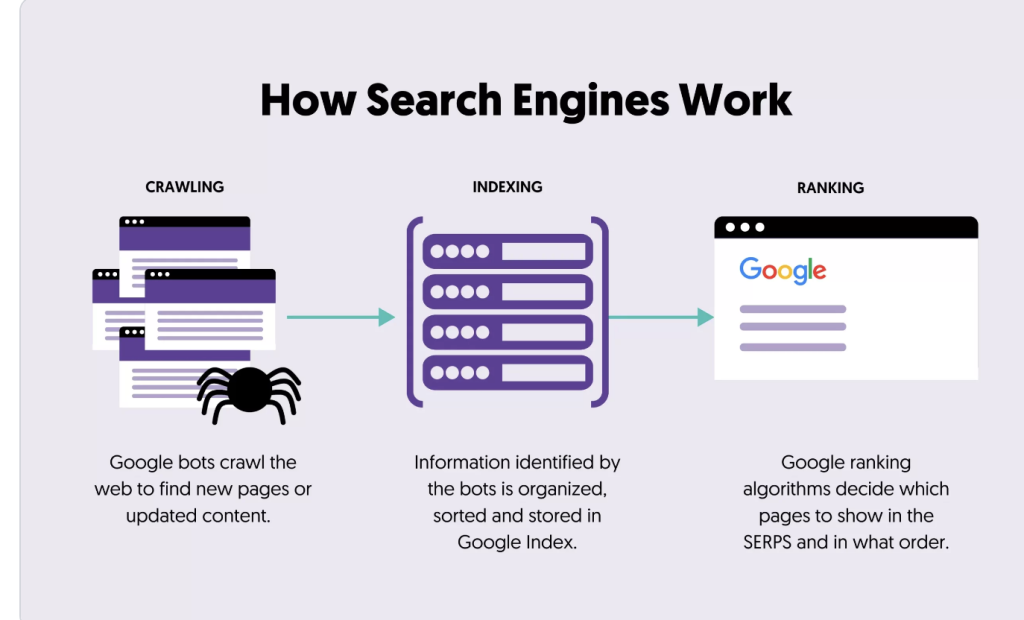
Every search engine, whether it’s Google, Bing, or something newer, runs on some version of the same three stage pipeline.
- Crawling: Which means discovering pages that exist
- Indexing: understanding and storing those pages on the database.
- Ranking: deciding which pages to show, and in what order, for a given search query
Each stage depends on the one before it. If a page never gets crawled, it can’t be indexed. If it never gets indexed, it can never rank. That chain matters, and we’ll come back to it throughout this guide.
Stage One: Crawling
What Is Crawling, Actually?
Crawling is the process where search engines discover content across the web using automated programs called crawlers, also known as bots or spiders. Google’s main crawler is called Googlebot.
Picture the internet as an enormous, unmapped city with billions of buildings, and new ones being constructed every second.
Crawlers are like scouts sent out to explore this city, they walk on every street they can find, noting what buildings exist, and following every door and pathway that leads somewhere new.
Those pathways are links. Crawlers move from page to page primarily by following hyperlinks, both internal links within a site and external links between different websites.
How Crawlers Discover Your Pages
There are three main ways a crawler finds a page.
Through existing links. If another page, whether on your site or someone else’s, links to your page, a crawler can follow that link and discover it. This is the most natural, organic way pages get found.
Through a sitemap.A sitemap is a file, typically in XML format, that lists all the important pages on your site. You submit it directly to search engines through tools like Google Search Console, which helps search engine crawlers discover the pages on your site and ultimately results in them visiting your site.
Through direct submission. Google Search Console also lets you manually request that a specific URL be crawled. Useful for brand new pages or urgent updates, though it’s not a substitute for good site structure and linking.
What Crawlers Look At
When Googlebot visits a page it would gather the information like: the text content, images, videos, internal and external links, page structure, load speed, mobile compatibility, and a long list of technical signals.
Crawl Budget
Google doesn’t have unlimited resources so it doesnt crawl every page on every website constantly for infinite amount of time.
Each site gets what’s called a crawl budget, essentially a limited allowance of how many pages Googlebot will crawl within a given time period.
For small sites with a few dozen or a few hundred pages, this rarely matters much. But for large sites with tens of thousands of pages, crawl budget becomes a genuinely important technical consideration. If your site has a huge number of low value, duplicate, or broken pages, you’re wasting crawl budget that could otherwise be spent discovering and refreshing your actually important content.
This is why technical SEO often includes cleaning up unnecessary pages, fixing broken links, and blocking crawlers from wasting time on irrelevant sections of a site through tools like robots.txt.
What Can Block Crawling ?
A few common issues prevent crawlers from accessing your pages properly.
Robots.txt restrictions. This file tells crawlers which parts of your site they’re allowed to access. Misconfigure it, and you might accidentally block Google from crawling pages you actually want indexed. This happens more often than you’d think, especially after site migrations or redesigns.
The code that disallow crawling of webpage is:
User-agent: *
Disallow: /
Broken internal links. If your site has internal links to pages that don’t exist or have been removed, search engine crawlers may waste some crawl resources by following those broken links. The crawler will only discover that the page doesn’t exist after visiting the URL and receiving a “404 Not Found” response.
Noindex tags used incorrectly. A noindex tag tells search engines not to index a specific page. Sometimes these get left on pages accidentally, especially after moving a site from a staging or development environment into production.
Server errors and downtime. If your server is down or returning errors when a crawler visits, that visit is essentially wasted, and repeated failures can reduce how often Google bothers coming back.
Stage Two: Indexing
What Happens After a Page Is Crawled
Once Googlebot crawls a page, the content gets processed and, assuming it meets certain quality thresholds, gets stored in Google’s index. This index is a massive database of the entire web as Google understands it.
But, being crawled does not automatically mean being indexed.

That’s why you see a lot of pages in crawled currently not indexed section.
Why Would Google Skip Indexing a Page?
A few common reasons a crawled page never makes it into the index.
Thin or low value content. The pages having thin, low value and duplicate content are likely to be not indexed by google.
Duplicate content. If your page is nearly identical to another page, whether on your own site or someone else’s, Google may choose to index only one version and ignore the rest.
Quality concerns. Pages that seem to exist purely to manipulate rankings, rather than to genuinely help a reader, are less likely to be indexed favorably.
Explicit noindex instructions. As mentioned above, if you’ve told Google not to index a page, it won’t, regardless of quality.
Canonicalization issues. If your site has multiple URLs that lead to essentially the same content, and you haven’t specified which version is the canonical, or preferred, one, Google has to guess, and sometimes picks a version you didn’t intend.
Lack of Backlinks. If you site lack authoritative backlinks from your niche domain then google can clearly ignore your content.
How Google Understands Your Content
During indexing google analyzes the page to understand context, topic, structure, and relevance. This includes parsing your headers, identifying key entities and topics discussed, understanding the relationship between different sections of content, and even factoring in things like page structure and internal linking patterns.
This is part of why well organized, clearly structured content tends to perform better. It’s not just easier for humans to read, it’s also easier for Google’s systems to accurately understand what the page is actually about.
Checking If Your Pages Are Indexed
You can check whether a specific page is indexed by searching site colon followed by the exact URL in Google, or more reliably, by checking the URL inspection tool inside Google Search Console, which will tell you definitively whether a page is indexed and flag any issues preventing it.
If you’re managing a real website, checking your indexing status periodically is genuinely important. It’s common for pages to accidentally fall out of the index after site changes, and you’d otherwise have no way of knowing.
Stage Three: Ranking
The Part Everyone Actually Cares About
Ranking is where Google decides, out of everything in its index, which pages to actually show for a specific search query, and in what order. This is by far the most complex and closely guarded part of the entire process.
Google uses what’s often estimated to be hundreds of ranking factors, and the exact algorithm is not publicly disclosed, changes constantly, and varies depending on the type of query being searched. Nobody outside Google’s core engineering teams knows the complete picture, and even Google’s own public spokespeople have said the system is complex enough that no single person fully understands every interaction.
That said, we know a great deal about the broad categories that matter, based on Google’s own public statements, patent filings, and extensive independent testing across the SEO industry over many years.
Relevance
At the most basic level, Google is trying to match search intent to content. If someone searches how to remove a red wine stain, Google is looking for pages that actually, specifically address that problem, not just pages that mention wine or stains in passing.
Relevance involves keyword usage, but modern search engines go far beyond simple keyword matching. They analyze context, synonyms, related concepts, and the overall topic coverage of a page to judge whether it genuinely satisfies the intent behind a query.
Content Quality
Beyond relevance, Google evaluates whether content is genuinely well made. Is it accurate? Is it comprehensive? Is it clearly written? Does it avoid unnecessary padding and filler?
This is where the concept of E E A T comes in, standing for Experience, Expertise, Authoritativeness, and Trustworthiness. It’s not a literal numerical score Google calculates, but rather a framework described in Google’s own quality rater guidelines that reflects what the algorithm is broadly trying to reward.
Authority Signals
Backlinks remain one of the strongest signals search engines use to judge authority. When reputable, relevant websites link to your content, it acts as a vote of confidence, telling Google that other trusted sources consider your page valuable enough to reference.
Not all backlinks carry equal weight. A link from a well established, topically relevant, high authority site matters far more than dozens of links from low quality or unrelated sources.
User Experience Signals
Technical factors like page load speed, mobile usability, and overall site structure also play a role. A page that loads slowly, displays poorly on mobile devices, or is difficult to navigate creates a worse experience, and Google has increasingly incorporated these signals into ranking decisions over the years, particularly through metrics known as Core Web Vitals.
Freshness
For certain types of queries, especially ones tied to current events, trending topics, or rapidly changing information, content freshness matters. Google tends to favor recently updated or published content for these kinds of searches, while more evergreen topics rely far less on freshness as a ranking factor.
Personalization and Context
Rankings aren’t identical for everyone. Google factors in elements like the searcher’s location, search history, device type, and language preferences to tailor results. This is part of why two people searching the exact same term in different cities might see noticeably different results.
How These Three Stages Work Together
It’s worth reinforcing why understanding this full pipeline matters practically, not just theoretically.
If your content is genuinely excellent but poorly linked internally and missing from your sitemap, it might never get crawled in the first place, meaning none of that quality even gets a chance to matter.
If your content gets crawled but is too thin, duplicated, or low value, it might get skipped during indexing, again meaning ranking never even enters the picture.
Only once a page clears both the crawling and indexing hurdles does ranking quality actually come into play. This is why technical SEO and content quality aren’t competing priorities, they’re sequential dependencies. You need all three stages working properly, in order, for any of your SEO efforts to actually pay off.
Common Misconceptions About This Process
Misconception: Submitting a sitemap guarantees indexing. A sitemap helps Google discover your pages faster, but it’s not a guarantee of indexing. Quality and uniqueness still determine whether a discovered page actually makes it into the index.
Misconception: More crawling means better rankings. Crawl frequency and ranking quality are separate things entirely. A page can be crawled constantly and still rank poorly if the content itself doesn’t satisfy user intent well.
Misconception: The algorithm treats all pages on a domain equally. Google evaluates pages individually. A single page from an otherwise strong domain can still rank poorly if that specific page is weak, and conversely, a single strong page on an otherwise unremarkable domain can rank well.
Misconception: You can see exactly why a page ranks where it does. Nobody outside Google has full visibility into the exact weighting of every ranking factor for any given query. SEO involves testing, observing patterns, and making informed decisions based on known principles, not precise formulas.
What This Means Practically For Your SEO Strategy
Understanding this three stage system should directly shape how you prioritize your SEO work.
Start by confirming your site is actually crawlable. Check your robots.txt file, make sure important pages aren’t accidentally blocked, and ensure you have a clean internal linking structure with no orphaned pages.
Next, focus on indexability. Submit a proper sitemap, avoid duplicate content issues, and regularly check Search Console to confirm your important pages are actually indexed, not just crawled.
Only after those fundamentals are solid does it make sense to pour significant energy into ranking specific pages higher for competitive keywords. Building a mansion on a foundation that hasn’t been checked for cracks rarely ends well, and the same principle applies here.
Tools That Let You See This Process In Action
You don’t have to take any of this on faith. There are free tools that let you directly observe how crawling, indexing, and ranking are actually behaving on your own site.
Google Search Console is the single most important tool here, and it’s free. The Coverage report shows you exactly which pages are indexed, which are excluded, and why. The URL Inspection tool lets you check any specific page and see its crawl and index status in real time, along with a button to request indexing directly.
Server log files give you an even deeper view, showing you exactly when Googlebot visited your site, which pages it accessed, and how often. This is more advanced, and usually only worth digging into for larger sites, but it’s the most accurate picture available of actual crawler behavior.
Third party crawling tools like Screaming Frog let you simulate how a crawler moves through your site, revealing broken links, redirect chains, and orphaned pages before Google ever finds them itself.
Diagnosing Common Crawling and Indexing Problems
When a page isn’t performing the way you expect, the fastest way to diagnose the issue is to work backward through the three stages.
Step one, confirm the page is indexed. Use the URL Inspection tool in Search Console. If it says the page is not on Google, you’ve found your starting point.
Step two, check if it was ever crawled. If Google has never crawled the page at all, look for the root cause. Is it linked from anywhere else on your site? Is it included in your sitemap? Is it accidentally blocked by robots.txt?
Step three, if it was crawled but not indexed, look at quality signals. Is the content thin, largely duplicated elsewhere, or does it closely resemble another page on your own site? Google may simply have judged it not worth storing.
Step four, if it’s indexed but not ranking well, that’s a separate problem entirely. At this point you’re no longer dealing with crawling or indexing issues, you’re dealing with relevance, quality, and authority, the actual ranking factors covered earlier in this guide.
Working through these steps in order saves an enormous amount of wasted effort. Beginners often jump straight to worrying about ranking factors when the actual problem is that a page was never indexed in the first place.
Frequently Asked Questions
How long does it take for Google to crawl a new page? It varies enormously depending on how established your site already is. A well linked page on an established site might get crawled within hours or days. A page on a brand new site with little authority could take weeks. Submitting a sitemap and requesting indexing manually through Search Console can speed this up, but it’s not an instant guarantee.
Can I force Google to index my page immediately? You can request indexing through Search Console, which often speeds things up, but there’s no guaranteed instant indexing. Google still evaluates the page against its normal quality standards before deciding to store it.
Why did my page get deindexed after previously ranking well? This usually points to one of a few causes. A recent site change might have accidentally added a noindex tag, quality issues may have developed over time, a duplicate version of the page might now be preferred instead, or a broader algorithm update may have reassessed the page’s value. Checking Search Console’s Coverage report is the fastest way to identify which of these applies.
Do all search engines crawl and index in exactly the same way? The broad three stage framework applies across major search engines like Google, Bing, and others, but the specific technical implementation and weighting of ranking factors differs between them. Since Google represents the overwhelming majority of search traffic globally, most SEO strategy understandably centers around its specific systems and guidelines.
Does having more pages automatically mean more crawling? Not necessarily, and this is a common misunderstanding. Crawl frequency is influenced far more by a site’s overall authority, how often content actually changes, and how well internally linked the site is, rather than simply the total page count.
What’s the difference between crawling and indexing in simple terms? Crawling is discovery, Google finding that a page exists. Indexing is storage and understanding, Google actually reading, processing, and saving that page into its searchable database. A page can be crawled without ever being indexed, but it can never be indexed without first being crawled.
Lastly
Search engines run on a deceptively simple sounding process. Crawl the web, understand what’s found, and rank it based on relevance, quality, and trust. But within that simple framework sits an enormously complex system built from decades of engineering, constant algorithm updates, and billions of pages being evaluated every single day.
Understanding crawling, indexing, and ranking as distinct, sequential stages gives you a genuinely useful mental model for diagnosing SEO problems, prioritizing your efforts correctly, and cutting through a lot of the confusing or outdated advice you’ll find elsewhere online.
Get your site properly crawlable, make sure your best content actually gets indexed, and then focus your energy on the quality and authority signals that drive rankings. Do that consistently, and you’re already ahead of most sites competing for the same audience.